
Windows app

X VVC Encoder - Free H.266 Encoder for Windows

X VVC Encoder turns any video into H.266 / VVC - files about 30-50% smaller than HEVC at the same quality. Drop in one video or a whole folder, pick a use case and press Encode. Version 1.1 adds Fraunhofer VVenC, a batch queue and a brand-new look.

Version
1.1
Size
11.5 MB
Windows
8.1, 10 and 11
Price
Free
X VVC Encoder
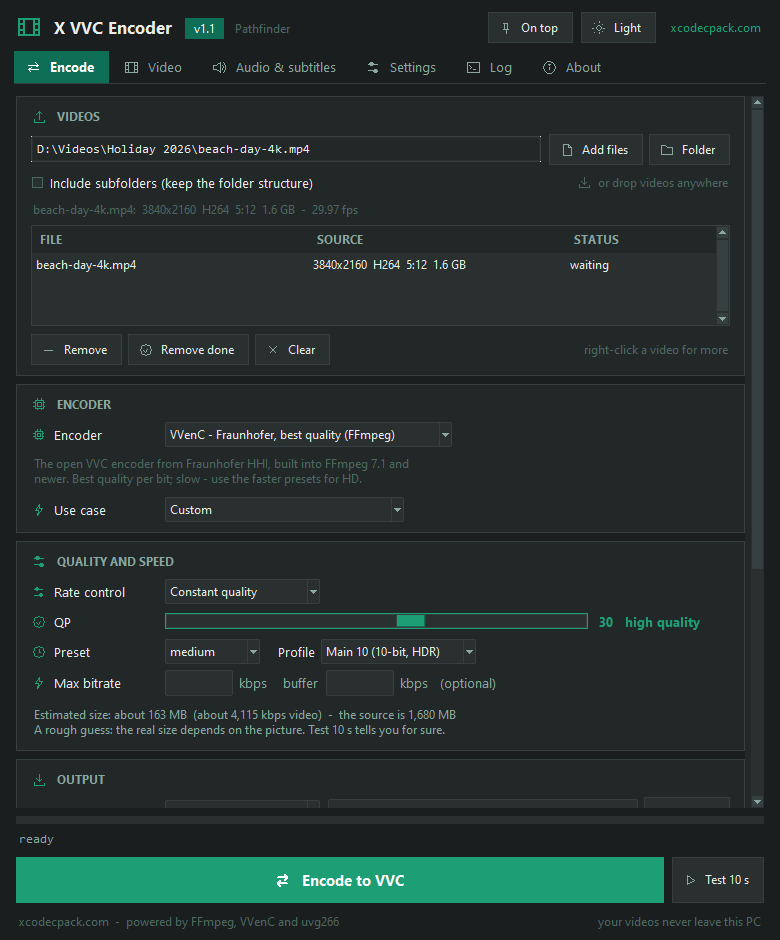
X VVC Encoder 1.1 - Encode tab with a 4K video, the VVenC encoder, QP quality and the estimated size
Advertisement
Portable app
VVenC and uvg266 - the two open VVC encoders in one window
Batch queue - many videos or a whole folder, drag and drop
Target size and Test 10 s - know the size before a long encode
Audio, subtitles and HDR kept - MKV, MP4 or raw .266
Free - Windows 8.1, 10 and 11 - v1.1 - 11.5 MB

New in 1.1 "Pathfinder": see what's new →

Advertisement

What is H.266 / VVC?

H.266, also called VVC (Versatile Video Coding), is the successor of HEVC.

At the same picture quality, VVC files are about 30-50% smaller than HEVC and around 70% smaller than H.264. That matters most for 4K, 8K and HDR video.

The price is time: VVC encoding is slow, and playback still needs a recent player or the X VVC Codec. X VVC Encoder makes the encoding part simple.

What X VVC Encoder does

Two VVC encoders - Fraunhofer VVenC through FFmpeg for the best quality per bit, and uvg266 from Tampere University for speed
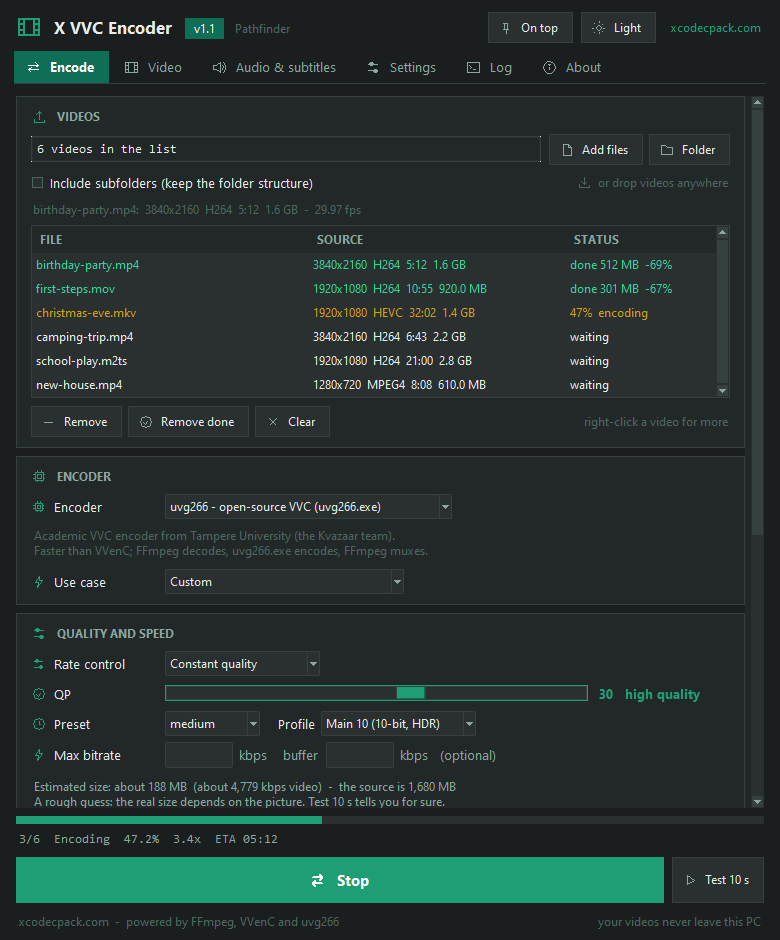
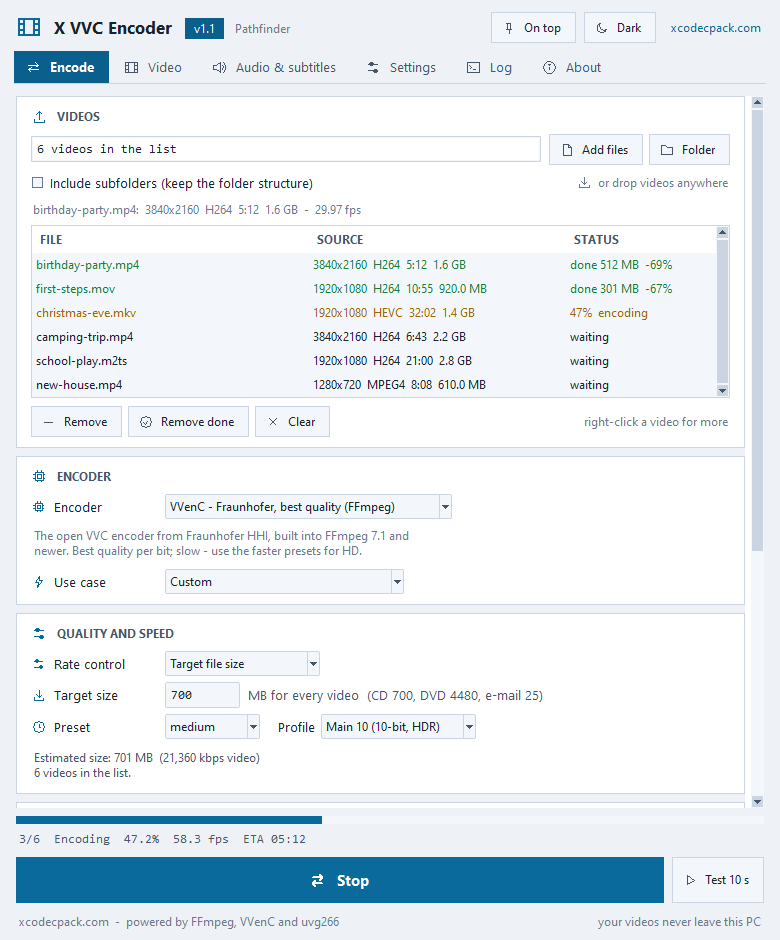
Batch queue - add many videos or a whole folder with subfolders, or drop them on the window; each shows its status and the size saved
Quality, bitrate or file size - constant quality (QP), average bitrate or a target size in MB worked out for every video
Test 10 s - VVC is slow - check quality and size on ten seconds before a long run
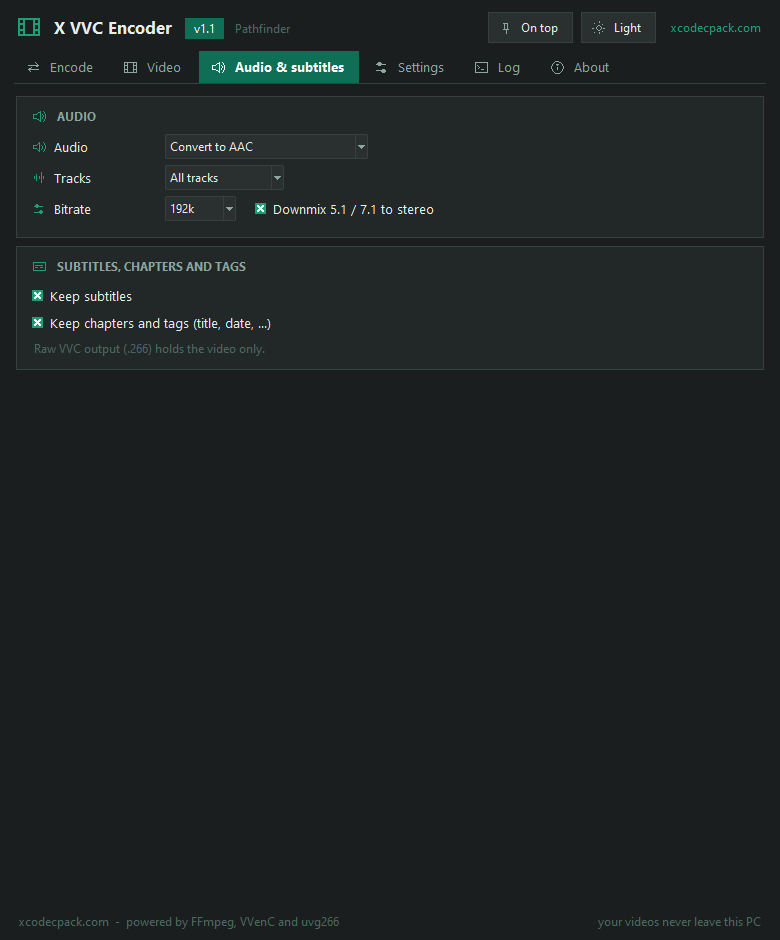
Audio and subtitles kept - copy every track or convert to AAC, Opus, AC3 or FLAC; subtitles, chapters and tags kept in MKV
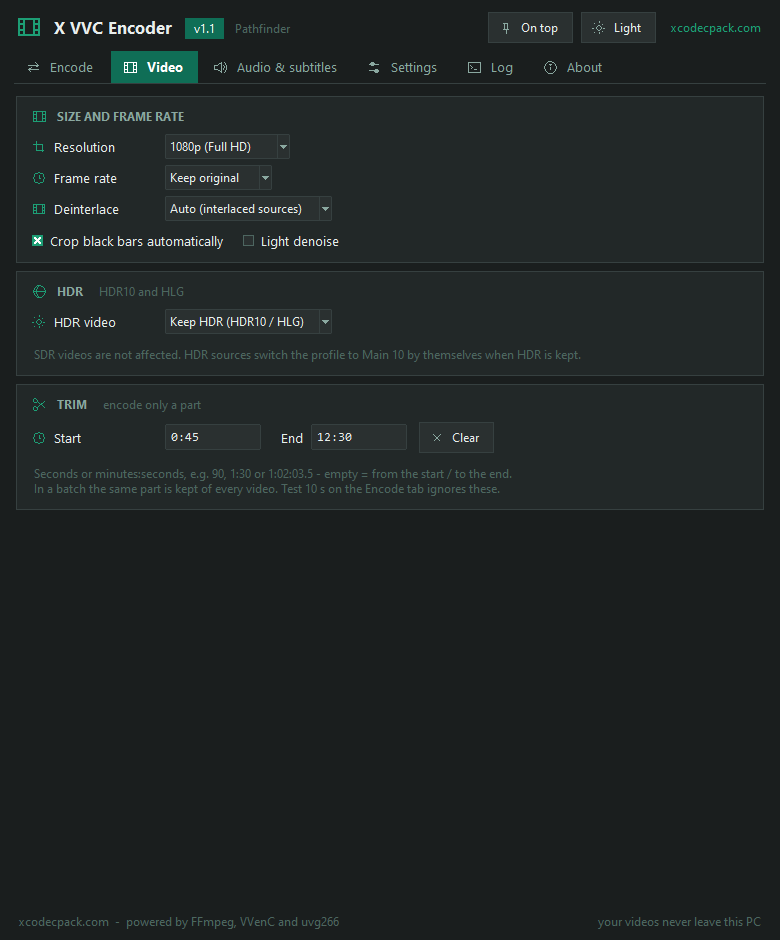
Resize, crop, trim - shrink without upscaling, change the frame rate, deinterlace, cut black bars, keep only a part
HDR and 10-bit - Main 10 encoding with the BT.2020, PQ and HLG flags kept, or HDR tone mapped to SDR
MKV, MP4 or raw .266 - mkvmerge is used for MKV when FFmpeg cannot mux raw VVC; MP4 for newer players
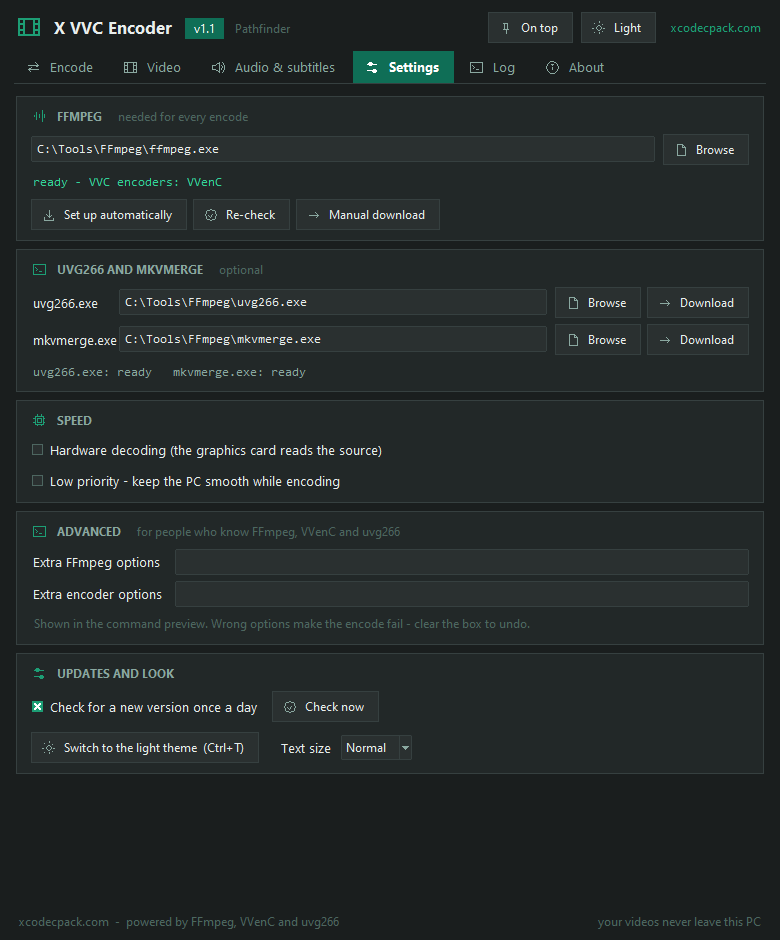
FFmpeg in one click - Settings - Set up automatically fetches FFmpeg and puts it where the app finds it
Dark and light theme - icon tabs, large text, settings remembered, sleep or shut down when a batch ends

X VVC Encoder screenshots

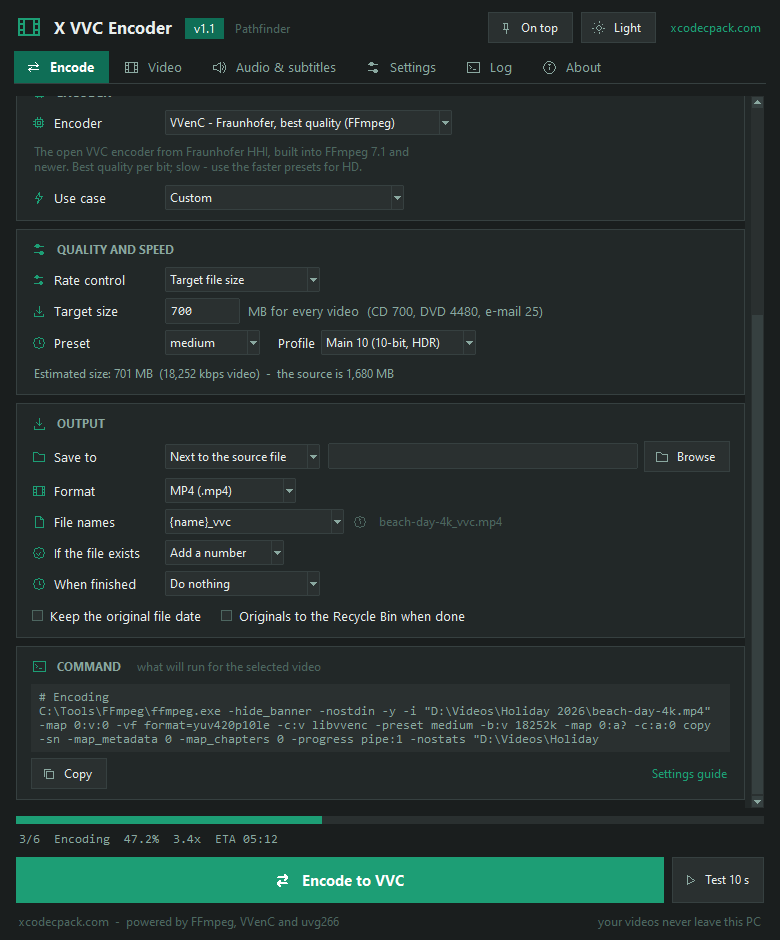
X VVC Encoder 1.1 - Encode tab with a 4K video, the VVenC encoder, QP quality and the estimated sizeX VVC Encoder 1.1 - batch queue of six videos encoding to H.266 with uvg266, with the size saved per fileX VVC Encoder 1.1 - target file size mode set to 700 MBX VVC Encoder 1.1 - Video tab with resolution, frame rate, deinterlace, crop black bars, HDR and trimX VVC Encoder 1.1 - Audio and subtitles tab with AAC conversion, all tracks and stereo downmixX VVC Encoder 1.1 - Settings tab with one-click FFmpeg setup, uvg266 and mkvmergeX VVC Encoder 1.1 - light theme while a batch of videos is encoding to VVC

Encode - one video with VVenC, quality and estimated size (1 / 7)

How to use X VVC Encoder - settings explained

Set up FFmpeg and the encoders

FFmpeg reads the video and builds the file; VVenC lives inside FFmpeg.

  1. Set up FFmpeg. Open Settings and click Set up automatically. For VVenC you need FFmpeg 7.1 or newer with libvvenc - the line under the box shows if VVenC is ready.
  2. Add uvg266 (optional). Download uvg266.exe, then click Browse next to it in Settings.
  3. Add mkvmerge (recommended for MKV). Install MKVToolNix - the app finds mkvmerge by itself.

By hand? Put ffmpeg.exe and ffprobe.exe from free-codecs.com next to the app and click Re-check.

Encode a video to H.266 / VVC

From MP4, MKV, AVI or MOV to a much smaller VVC file.

  1. Add the video. Click Add files or drop it on the window.
  2. Pick a use case. Quick test of VVC is fast; Everyday and Archive take longer and look better.
  3. Test, then encode. Click Test 10 s, check the result, then Encode to VVC.

VVenC or uvg266?

Both make standard H.266 files.

EncoderSpeedSize vs x265 HEVCNeeds
VVenC (Fraunhofer HHI)SlowAbout 30-50% smallerFFmpeg 7.1+ with libvvenc
uvg266 (Tampere University)FasterAbout 10-25% smalleruvg266.exe

QP, preset and profile

The settings that decide the size, the look and the time.

  1. QP (quality). Lower is better and larger. 22-26 for archives, 28-30 for everyday viewing, 32-35 for small files. QP 30 looks about like x265 CRF 24.
  2. Preset. VVC is slow. Start with faster or fast for 1080p; keep slow for short clips or overnight batches.
  3. Profile. Main 10 for the best quality and for HDR. Only 8-bit builds of uvg266 need 8-bit input.
  4. Target size. In Rate control choose Target file size to fit a video into a size in MB.

MKV, MP4 or raw .266

Where the VVC video goes.

  1. MKV keeps every audio track and subtitle and plays in VLC and MPC-HC. With mkvmerge set up it always works, even with older FFmpeg builds.
  2. MP4 suits newer players; it needs FFmpeg 7.1 or newer.
  3. Raw .266 is the bare VVC stream, without sound - for testing and analysis tools.

Playing the files: install the X VVC Codec for MPC-HC, MPC-BE and PotPlayer.

Encode a whole folder

Let a big batch run overnight.

  1. Add the folder. Click Folder, tick Include subfolders for a whole tree.
  2. Set the finish. When finished - Shut down Windows, with a countdown you can cancel.
  3. Continue later. Set If the file exists to Skip the file and start again to finish a stopped batch.

What's new in X VVC Encoder

v1.1 "Pathfinder" November 2026 latest
  • Fraunhofer VVenC encoder through FFmpeg - the best VVC quality, picked automatically when FFmpeg has libvvenc
  • Batch queue: many videos, a whole folder with subfolders, drag and drop, size saved per file and a right-click menu
  • Target file size mode and Test 10 s before the full encode
  • Audio: copy, AAC, Opus, AC3 or FLAC, all tracks or the first, stereo downmix; subtitles, chapters and tags kept
  • Resize, frame rate, trim, deinterlace, auto crop, light denoise; HDR flags kept or tone mapped to SDR
  • mkvmerge fallback for MKV output when FFmpeg cannot mux raw VVC
Show 4 more changes
  • New look with icon tabs, dark and light theme and large text; one-click FFmpeg setup; update check
  • Drag and drop never worked; nothing was remembered between runs; the Settings guide link went to a missing page
  • A stopped encode left a half file behind; closing the window left the encoder running
  • 4:2:2 sources and some frame rates gave broken files
v1.0.1 October 2026 1 change
  • The window fits small screens; Ctrl+Enter starts encoding
v1.0 2026 1 change
  • First release: uvg266 with FFmpeg, QP or bitrate, MKV, MP4 and raw .266 output

VVC encoder - frequently asked questions

Is X VVC Encoder really free?
Yes - free for personal and commercial use, with no ads in the app, no nag screens, no signup and no telemetry.
What is the difference between H.266, VVC, VVenC and uvg266?
H.266 and VVC are two names for the same video standard. VVenC (from Fraunhofer HHI) and uvg266 (from Tampere University) are two encoders that make H.266 files. X VVC Encoder runs both from one window.
Which VVC encoder should I use?
VVenC gives the best quality per megabyte and is the default when your FFmpeg build includes libvvenc (FFmpeg 7.1 or newer). uvg266 is faster but makes larger files. Run Test 10 s with both to compare on your own videos.
Can I convert a whole folder to H.266?
Yes. Since version 1.1 you can add many videos or a whole folder with its subfolders, or drop them on the window. Every video gets a status and the size it saved, and you can sleep or shut down the PC when the batch ends.
Why is VVC encoding so slow?
VVC trades encode time for compression. Expect a few frames per second for 1080p on a typical desktop CPU and much less for 4K. Use the faster presets for HD and Test 10 s to check settings first.
What QP value should I use?
QP works like CRF in x265: lower means higher quality and bigger files. Use 22-26 for archives, 28-30 for everyday viewing and 32-35 for small files. QP 30 looks about like x265 CRF 24.
How much smaller is VVC than HEVC?
With VVenC, about 30-50% smaller than x265 HEVC at the same quality, depending on the video. uvg266 is less efficient - typically 10-25% smaller than x265.
Are audio tracks and subtitles kept?
Yes. Every audio track is copied by default, or converted to AAC, Opus, AC3 or FLAC. MKV keeps all subtitles and chapters; MP4 gets text subtitles, and audio MP4 cannot hold is converted to AAC by itself.
Can I play the output files?
Yes. Install X VVC Codec for H.266 playback in MPC-HC, MPC-BE and PotPlayer, or X Codec Pack for everything. Recent VLC builds also play VVC; hardware decoding is still rare.
MKV or MP4 for VVC?
MKV is the safe choice and keeps every track. MP4 needs FFmpeg 7.1 or newer. If your FFmpeg cannot put raw VVC in MKV, install MKVToolNix and the app uses mkvmerge automatically.
Does it support 10-bit and HDR?
Yes. VVenC always encodes Main 10, and uvg266 does too with a 10-bit build. HDR10 and HLG sources keep their BT.2020 and transfer flags, or can be tone mapped to SDR.
Do I need to download FFmpeg separately?
Only once, and the app can do it: open Settings and click Set up automatically. For VVenC use an FFmpeg 7.1+ build with libvvenc and put ffmpeg.exe and ffprobe.exe next to the app.
Which Windows versions does it run on?
Windows 8.1, 10 and 11, 64-bit. The window fits 1366x768 laptop screens, and there is a dark and a light theme.

Get X VVC Encoder for Windows

Free - Windows 8.1, 10 and 11 - v1.1 - portable .exe - no install

Download X VVC Encoder 1.1
Advertisement