v1.0 - FAAC-powered

The free AAC encoder for Windows

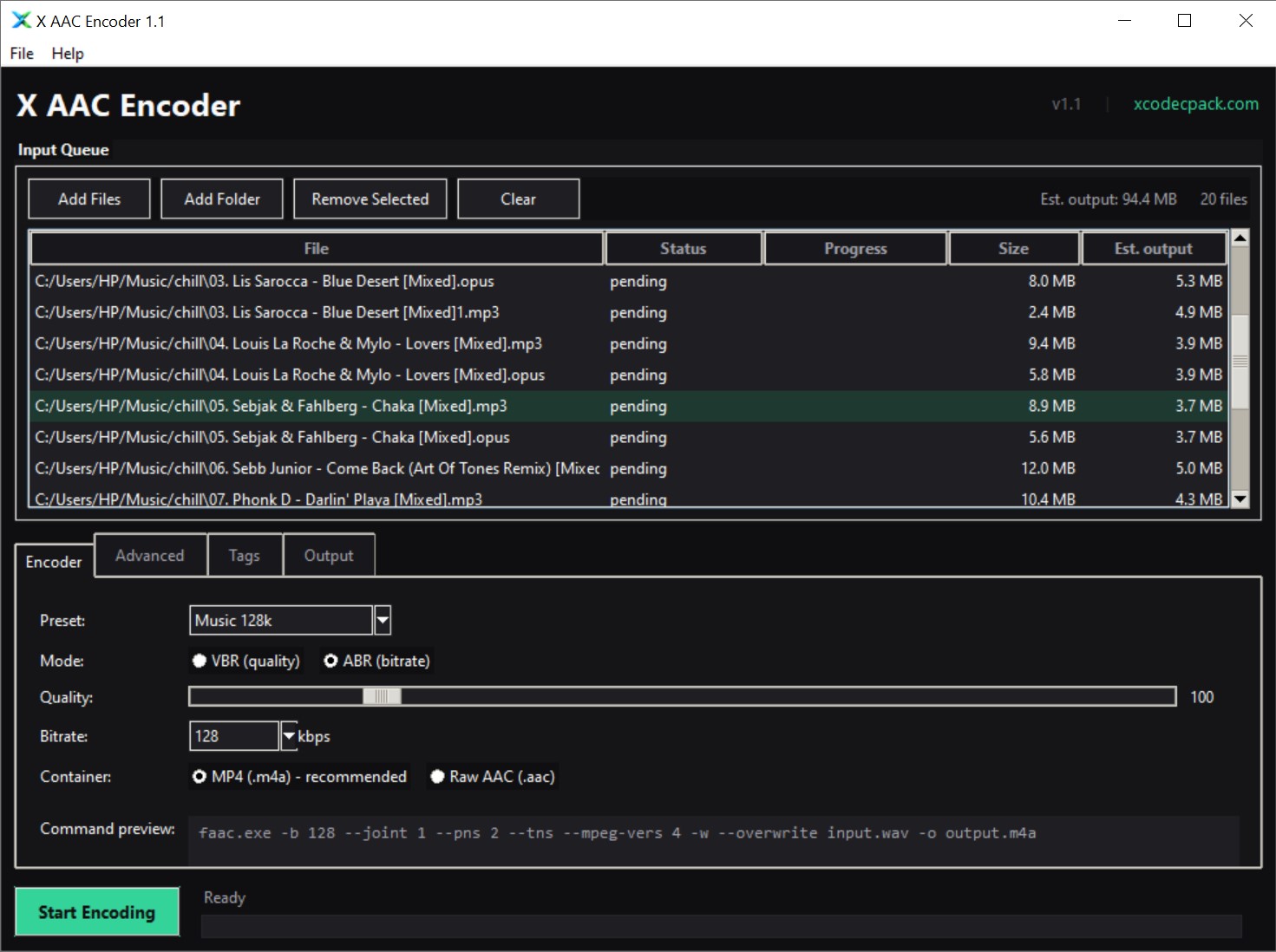
X AAC Encoder turns any audio or video file into AAC or M4A with batch processing, full metadata tagging, and cover art support. Powered by FAAC, wrapped in a clean modern interface. No ads, no spyware, no bundled software.

18.2 MB Installer size
20+ Input formats
100% Free forever
Advertisement

Everything the old FAAC GUI never had

Built on the same battle-tested FAAC encoder, redesigned for how people actually convert audio in 2026.

Batch encoding

Add files one at a time or drop an entire folder. Encode a hundred tracks with one click, with per-file progress and error reporting.

Universal input

WAV natively, plus MP3, FLAC, OGG, OPUS, M4A, WMA, APE, and WavPack through the included FFmpeg. Even rips audio from video files.

Full metadata tagging

Title, artist, album, album artist, composer, year, genre, track, disc, comment, compilation flag, plus cover art embedded as MP4 artwork.

VBR and ABR modes

Target a quality level with VBR (quantizer 10 to 500) or lock to a bitrate with ABR (64 to 320 kbps). Six presets from voice to archival.

Smart defaults

Six tuned presets: Voice 64k, Podcast 96k, Music 128k, HQ Music 192k, Transparent, Archival VBR. Tweak anything or save your own.

Live command preview

See the exact FAAC command that will run before you start. Great for learning the FAAC flags or debugging your encoding pipeline.

MP4 or raw AAC

Output .m4a for maximum compatibility with iTunes, phones, and every modern player, or .aac for streaming and hardware with strict parsers.

Filename templates

Pick an output folder or write beside each source. Name files with {artist}, {album}, {title}, or {stem} placeholders pulled from source tags.

Zero telemetry

No calls home, no accounts, no registration. Runs fully offline. Portable mode available for USB sticks and locked-down systems.

Encode anything to AAC or M4A

WAV is read natively by FAAC. Everything else is transparently decoded through the included FFmpeg build before it reaches the encoder - no intermediate files, no manual conversion.

.wav
.mp3
.flac
.ogg
.opus
.m4a
.aac
.wma
.ape
.wv
.aiff
.mka
.mp4
.mkv
.avi
.mov
.webm
.ts
.mpg
.oga
.m4b
.mpeg

Powered by FAAC and FFmpeg

Two proven open-source tools do the heavy lifting. Both ship in the installer and sit alongside the app in the install folder, so you can swap in a newer build at any time without reinstalling.

Encoder

FAAC faac.exe

The Freeware Advanced Audio Coder - the open-source AAC encoder that does the actual encoding to AAC and MP4 (.m4a). Mature, transparent at 128 kbps and above for most music, and the standard choice on Windows when you need an AAC encoder without installing iTunes.

Download FAAC →
Decoder

FFmpeg ffmpeg.exe + ffprobe.exe

The universal media decoder - transparently converts MP3, FLAC, OGG, OPUS, M4A, WMA, APE, WavPack, AIFF, and audio from video files into the raw WAV data FAAC needs. Ships with ffprobe for accurate duration analysis and progress reporting.

Download FFmpeg →

Four steps to AAC

From messy library to tagged AAC files in less time than it takes to make coffee.

01 / Add

Load files or folders

Drag in a mix of WAV, FLAC, MP3, OGG, and video files, or point at a whole folder for recursive scan.

02 / Configure

Pick a preset

Voice, Podcast, Music, HQ Music, Transparent, or Archival. Or skip presets and set VBR, ABR, joint stereo, and PNS manually.

03 / Tag

Bring your metadata

Copy tags from source automatically, override for the whole batch, and drop in a cover art image.

04 / Encode

Hit Start

Watch the queue fly through. Cancel at any time, skip or auto-rename conflicts, and get a clean summary when done.

Advertisement

Every FAAC option, cleanly exposed

The old FAAC GUI showed four checkboxes. X AAC Encoder surfaces the full FAAC feature set with tooltips that explain what each option actually does.

Bitrate and quality

VBR, ABR, or a preset

  • VBR quantizer quality 10 to 500, with 100 being transparent for most sources.
  • ABR bitrate from 64 to 320 kbps with standard presets baked in.
  • Frequency cutoff in Hz, with auto mode that lets FAAC pick based on bitrate.
  • Save your own presets as JSON and reload them on any machine.
Psychoacoustic

Stereo, TNS, and PNS

  • Joint stereo off, Mid/Side, or Intensity Stereo for aggressive low-bitrate coding.
  • Temporal Noise Shaping to reduce pre-echo artifacts.
  • Perceptual Noise Substitution level from 0 to 10.
  • Block type control for specialised testing and tuning.
Container

MP4 or raw AAC stream

  • MP4 output (.m4a) for maximum compatibility and metadata support.
  • Raw AAC stream (.aac) for streaming and strict hardware decoders.
  • MPEG-4 AAC by default, with MPEG-2 fallback for legacy devices.
  • Ignore WAV length flag for source files over 4 GB.
Workflow

Output and safety

  • Output folder selector with same-as-source default.
  • Filename templates using {stem}, {artist}, {title}, {album}.
  • Conflict policy: skip, overwrite, or auto-rename with (2), (3)...
  • Cancel anywhere without leaving behind half-encoded files.

Frequently asked questions

Common questions about AAC encoding, FAAC, and X AAC Encoder specifically.

What is X AAC Encoder?
X AAC Encoder is a free Windows desktop application that encodes audio files to AAC and M4A format. It is powered by the FAAC encoder and adds a modern batch-capable interface, metadata tagging, cover art embedding, and transparent decoding of more than twenty input formats through an included FFmpeg build. Both FAAC and FFmpeg ship with the installer as separate files alongside the app.
Is X AAC Encoder really free?
Yes. X AAC Encoder is completely free for personal and commercial use. The application itself contains no ads, no bundled software, no trial limits, no watermarks, and no calls home. Our website is supported by AdSense banner ads above and below the content, but nothing inside the program.
What input formats does it support?
WAV is read natively. Everything else is decoded on the fly through an included FFmpeg build: MP3, FLAC, OGG Vorbis, OPUS, M4A, AAC, WMA, APE, WavPack, AIFF, MKA, plus audio tracks from MP4, MKV, AVI, MOV, WebM, TS, and MPEG video files. If FFmpeg can read it, X AAC Encoder can encode it to AAC.
What is the difference between FAAC and Apple AAC?
Apple AAC is a proprietary encoder that ships with iTunes and macOS. FAAC is an open source AAC encoder that runs anywhere. Apple AAC generally scores slightly better in blind listening tests at very low bitrates (below 96 kbps), but FAAC is transparent at 128 kbps and above for most material, is free to redistribute, and is the standard choice on Windows when you need a GUI encoder without installing iTunes. For most users at normal bitrates, the difference is inaudible.
Does it support batch encoding?
Yes. Add any number of files or point at a folder for recursive scan, and X AAC Encoder will process the entire queue with the same settings. Each file can retain its own source metadata (title, artist, album, cover art) automatically, or you can override tags for the whole batch from the Tags panel.
Which is better, VBR or ABR?
VBR (variable bitrate) gives consistent perceptual quality across the file and usually produces smaller files at the same audible quality. ABR (average bitrate) gives predictable file sizes, which matters if you are encoding for a device with strict storage limits or streaming at a fixed rate. For music archiving, use VBR at quality 100 or higher. For portable devices at known bitrates, use ABR with the preset that matches your target.
Does it run on Windows 11?
Yes. X AAC Encoder runs on Windows 7, 8, 8.1, 10, and 11, on both 32-bit and 64-bit systems. The installer requires no runtime dependencies - Python, .NET, or Visual C++ redistributables are not needed. The main app is a single self-contained executable, with faac.exe, ffmpeg.exe, and ffprobe.exe alongside it in the install folder.
Can I embed cover art?
Yes. Point the Cover art field in the Tags tab to a JPEG or PNG image and X AAC Encoder embeds it as MP4 cover art in the .m4a output. If you have Copy tags from source enabled, cover art is also pulled from each source file automatically. Raw .aac streams do not support metadata, so cover art only applies to the MP4 container output.
Is there a command-line version?
X AAC Encoder is GUI only. For command-line automation, use the included faac.exe and ffmpeg.exe directly - they live in the install folder next to the app, and the Command preview pane in the Encoder tab shows the exact FAAC command the app runs, ready to copy and script.
Can I update FAAC or FFmpeg without reinstalling?
Yes. faac.exe, ffmpeg.exe, and ffprobe.exe sit next to the app in the install folder as separate files. Download a newer version and replace the existing copy - the app picks it up on next launch. No reinstall, no uninstall, no registry changes.
How does X AAC Encoder compare to the old FAAC GUI?
The original FAAC GUI (faacgui.exe) was a minimal front-end that exposed about five options: input file, output file, quantizer quality, MPEG version, and AAC object type. X AAC Encoder exposes every FAAC option including joint stereo modes, PNS, TNS, block type control, bandwidth cutoff, and the full MP4 tagging flag set - plus it adds batch encoding, a file queue, decode support for twenty-plus formats, filename templates, save/load presets, and a modern dark interface.

Ready to encode?

Free forever. Windows 7, 8, 10, and 11. Installer or portable, your choice.

Download X AAC Encoder 1.0
Version 1.0 18.2 MB Windows 7 / 8 / 10 / 11 32 and 64-bit
Advertisement