X Radio Stream Finder
Browse, search and play 35,000+ internet radio stations on Windows. Bookmark the songs you hear into playlists, then find them later on YouTube, Spotify or Beatport in one click. Built-in ffplay player, My Stations with M3U8 export - free, no ads, no registration.
X Radio Stream Finder for Windows
A native Windows desktop app for finding and playing internet radio. No browser needed, no ads, no account. Searches the Radio Browser community database with over 35,000 active stations worldwide.
Optional - for the built-in player
ffplay.exe is included in every standard FFmpeg download.
What's new in v2.7
Codename "Song Hoarder" - because "I'll remember that song later" has never worked once. Now you keep every one, guilt-free.
Every song you bookmark now lives in its own Songs tab. Right-click any song to file it into playlists like "Workout" or "Chill", and add notes so you remember why you saved it.
Double-click a saved song to search it on YouTube, Spotify, Apple Music, Deezer, SoundCloud, Beatport, Bandcamp and five other services. Station tags are stripped automatically, and searched songs get a tick so your list doubles as a to-do list.
The player got a makeover: station artwork, a LIVE badge with a listening timer and an animated visualizer. Rounded buttons and an even toolbar finish the look.
View your history by day, by station or by song, with the most played songs on top. A Songs only filter hides station IDs, jingles and "offline" notices.
Press Ctrl+B to bookmark the song on air, or right-click the Star button to drop it straight into a playlist. Export any playlist as a web page with search links you can open on your phone.
v2.6 was an internal build that was never released, so its features debut here: song stars, a pop-up for every track change, and a new portable build that stops Windows Defender false positives. Coming from v2.5? All of this is new to you.
Screenshots
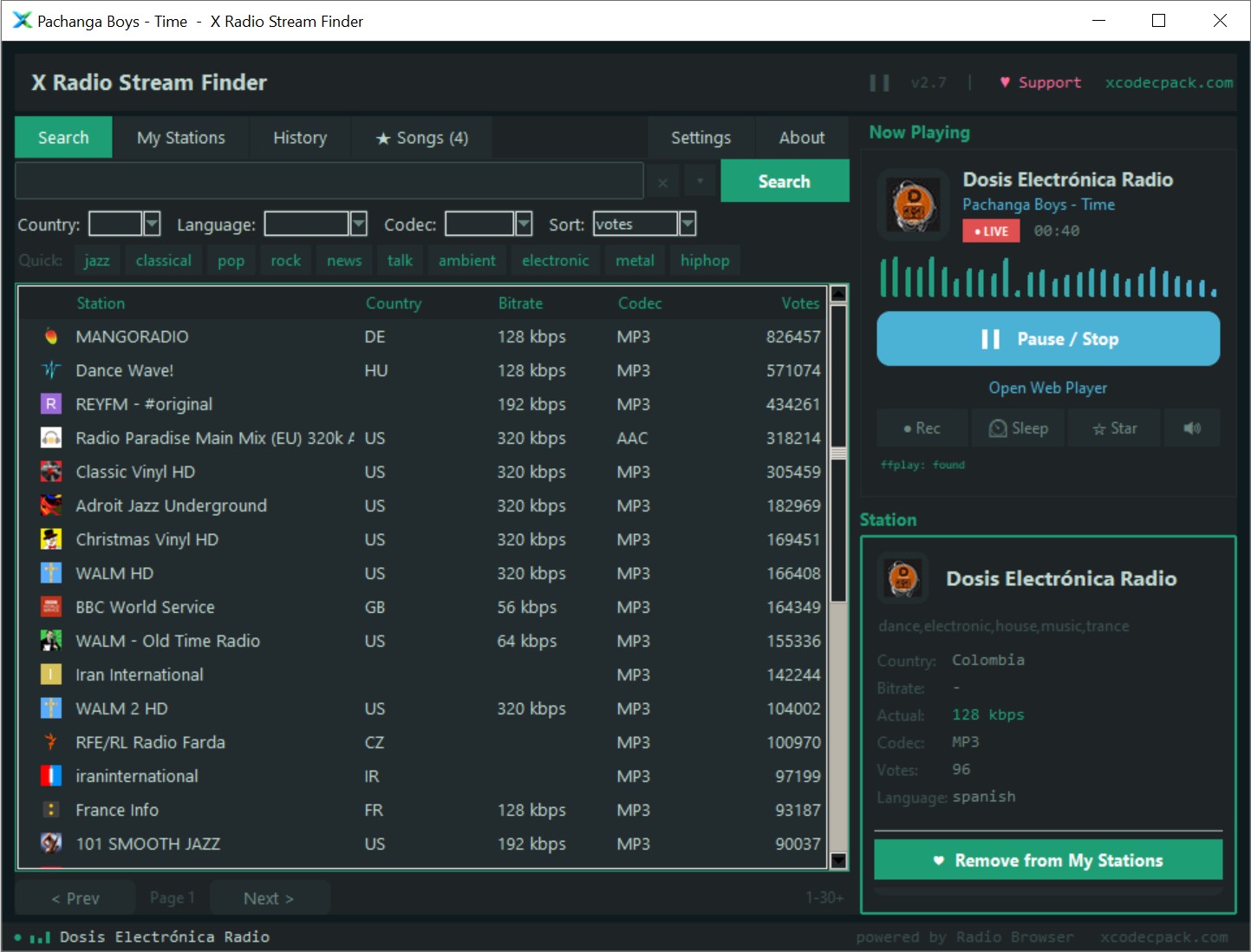
Find and play radio stations in seconds
Search or browse
Type a genre, station name or country and press Search. Or click a quick tag - jazz, classical, pop, rock, news, ambient and more. Results show station name, country, bitrate, codec and community vote count from the Radio Browser database.
Play or save
Double-click any station to play it instantly in the built-in player. Click the heart button to add it to My Stations. Right-click for more options - open in VLC or MPC-HC, copy the raw stream URL, or save a single-station M3U or PLS file.
Build your playlist
The My Stations tab keeps your saved stations across sessions. Reorder them with Move up/down, remove any you no longer want, then export the whole list as M3U8 for use in VLC, Winamp, foobar2000 or any player that reads playlists.
Everything you need to find and manage internet radio
Built-in player
Streams play directly inside the app via ffplay, no window switching or browser tabs. The Now Playing panel shows station artwork, a LIVE timer and an animated visualizer.
My Stations
Save any station to a persistent favourites list that survives app restarts. Reorder by drag or buttons. Stations are saved automatically with no manual save step.
M3U8 / PLS export
Export your entire My Stations list as an M3U8 playlist compatible with VLC, foobar2000, Winamp, MPC-HC and any player that reads playlists. Import existing M3U or PLS files too.
35,000+ stations
Powered by the Radio Browser community API - the largest open database of internet radio stations. Updated continuously by its community. Covers every genre and country.
Sort and filter
Filter by country (20+ countries), codec (MP3, AAC, OGG, OPUS, FLAC) and sort by votes, click count, bitrate or name. Click any column header to re-sort the current results.
External player fallback
No ffplay? No problem. The app auto-detects VLC and MPC-HC, or opens the stream URL in your browser. Works with any media player that can handle HTTP streams.
Song playlists
Heard a great track on the radio? Bookmark it with one click or Ctrl+B. Sort saved songs into playlists, add notes and see how many times you heard each one.
Search songs later
Send any saved song to YouTube, YouTube Music, Spotify, Apple Music, Deezer, SoundCloud, Beatport, Bandcamp, Discogs, Last.fm, Genius or Google. Searched songs are ticked off automatically.
Listening history
Every song title the station sends is logged. Group the history by day, station or song, filter out jingles and station IDs, and copy or export what you find.
Prefer listening in your browser?
The free-codecs.com Web Player lets you search, stream and build playlists entirely in your browser - no download required. Works on Windows, Mac, Linux, iOS and Android.
Open Web Player